

Most professionals believe email volume is their problem. It's not. The average knowledge worker receives 120 emails per day but responds to fewer than 30. The bottleneck isn't reading — it's deciding what deserves attention, when to respond, and what those responses should accomplish. An ai email assistant doesn't just help you write faster. It changes which decisions you make and which you delegate entirely.
 Minimalist workspace representing inbox zero with natural morning light and calm aesthetic
The Problem with How We Currently Approach This
Email management advice has stagnated around the same three tactics for two decades: batch processing, keyboard shortcuts, and ruthless unsubscribing. These approaches treat email as a technical problem — a matter of speed and volume reduction. But the actual challenge is cognitive load.
Every email represents a potential obligation. When you open your inbox, you're not just reading messages. You're making rapid-fire decisions: Is this urgent? Does this require research before I respond? Will my reply create more work? Should this become a task? Is this person waiting on me? Each micro-decision depletes the same executive function you need for deep work.
Traditional email clients expose you to this decision fatigue by design. They present messages chronologically, forcing you to evaluate each one in sequence. Even "priority inbox" features simply reorder the queue — you still face the same decisions, just in a different order. Smart labels and filters help, but they require upfront configuration that most people abandon after a week.
The rise of email plugins and browser extensions promised relief. Grammar checkers, send-later tools, read receipts, signature managers — each solving a micro-problem while adding another layer of interface complexity. We've ended up with inboxes that feel like cockpits: dozens of buttons, unclear hierarchies, and the persistent anxiety that we're missing something important buried three screens down.
What's conspicuously absent from these solutions is context. Your inbox exists in isolation from your calendar, your task list, your energy levels, and your actual priorities. An email asking for a meeting next Thursday has completely different urgency depending on what your Thursday already looks like. A request for feedback on a document means something different if you've already committed to three deep work sessions this week. But your email client knows none of this.
What We've Observed at LIFE
LIFE's CORTEX engine processes email alongside calendar, tasks, health data, and behavioral patterns. What emerges from this integrated view challenges conventional inbox wisdom.
The most consistent pattern: response time variance predicts relationship health better than response time itself. Users who reply to some contacts within minutes but let others wait days create measurable trust erosion, even when average response time is reasonable. The issue isn't speed — it's inconsistency signaling deprioritization. This pattern appears across professional and personal contexts, suggesting that response time as a trust signal operates at a deeper psychological level than most productivity frameworks acknowledge.
Second, we've observed that the optimal number of "passes" through an inbox correlates strongly with message volume but weakly with role or seniority. Users processing 80–150 emails daily converge on three-pass systems regardless of whether they're executives, engineers, or freelancers. The three-pass triage model — scan for critical, process actionable, archive remainder — emerges naturally when people have enough volume to justify the overhead but not so much that they drown. Below 80 messages, single-pass processing works fine. Above 150, people either adopt aggressive filtering or suffer chronic inbox anxiety.
Third, the ai inbox triage patterns that stick are surprisingly conservative. Early CORTEX implementations offered aggressive auto-archiving and auto-responses. User adoption was low. What works instead: AI that proposes actions but requires confirmation for anything beyond simple categorization. Users want to feel in control even as they delegate decisions. The sweet spot appears to be AI that handles the first 60% of decision-making (categorization, priority scoring, summarization) while leaving final judgment to the human.
We've also tracked how email interacts with other life modules. Emails that reference calendar events get processed 3× faster on average than standalone messages. Emails that CORTEX converts into tasks have 40% higher completion rates than tasks created manually. This suggests that treating inbox as input queue — a preprocessing layer for other systems — reduces friction more than inbox-specific optimizations.
Energy patterns matter more than most users expect. Late-night email processing shows significantly higher "response regret" — measured by follow-up clarifications, apologies, or unsent drafts. CORTEX's most valuable intervention isn't writing better responses; it's preventing low-quality ones by surfacing energy and context gaps before the user hits send.
Finally, the ai email summarizer use case splits into two distinct modes: summarizing incoming messages (high value, frequent use) and summarizing threads (extremely high value, infrequent use). Users rarely need summarization for individual messages under 200 words. But thread summarization — condensing 15-message chains into key decisions and open questions — saves measurable time and reduces re-reading. The insight: AI should default to thread-level intelligence rather than message-level tricks.
The Framework: Contextual Inbox Architecture
Traditional email management treats your inbox as a destination. Contextual Inbox Architecture treats it as a preprocessing layer that routes inputs to appropriate systems based on full-life context.
Priority Scoring Against Real Commitments
An ai email assistant worth using doesn't score priority in isolation. It evaluates each message against your actual commitments across all life modules.
A meeting request for next Tuesday gets scored differently if your calendar shows back-to-back calls versus open space. An urgent project email gets surfaced immediately if it relates to a task with a deadline this week — but gets deferred if you've already allocated today to deep work on something else. A dinner invitation from a friend you haven't seen in months gets weighted against your social connection patterns, not just keyword matching on "dinner."
This requires the AI to maintain a live context graph: what you've committed to, what you're behind on, who you've been neglecting, what your energy curve looks like this week. The email itself is just a trigger. The priority score emerges from comparing that trigger against your current state across every module.
Implementation detail that matters: priority scores need confidence intervals. An email about "the Johnson proposal" should flag its own uncertainty if CORTEX doesn't have context on Johnson or the proposal. Surfacing uncertainty prevents false confidence and keeps the user calibrated to the AI's actual knowledge.
Smart Batching by Response Type
Not all emails deserve the same cognitive mode. The smart email reply ai approach batches messages by the type of thinking they require, not by sender or subject.
Quick acknowledgments — messages that need a response but don't require research or deliberation — batch together. "Got it, thanks." "I'll have that to you by Friday." "Connecting you both." These are high-velocity, low-stakes responses that benefit from batch processing during transition moments.
Deep responses — messages requiring thought, research, or emotional care — get scheduled for focus blocks when your energy and context are optimal. These might include difficult feedback, complex explanations, or relationship-sensitive replies. The AI identifies these not just by length but by sentiment, ambiguity, and relationship history.
Conversation starters — cold outreach, networking, new opportunities — batch separately because they require a different decision mode: Is this worth exploring? These benefit from weekly review sessions rather than daily processing.
The key insight: ai email prioritization should optimize for cognitive mode switching, not chronology. Responding to ten quick acknowledgments in a row is faster than interleaving them with deep responses, even though the interleaved approach feels more "inbox zero."
Response Template Intelligence
Smart email reply AI shouldn't write for you — it should accelerate your natural communication style by recognizing patterns in how you respond to similar situations.
When you've answered "What's your pricing?" twelve times this quarter, CORTEX should surface your most recent version and offer it as a starting template. When you've politely declined three lunch invitations this month using similar language, it should learn your declining pattern and suggest appropriate variations.
The sophistication comes from context-matching: An invitation from a potential client gets a different decline template than one from a casual acquaintance. A pricing question from a qualified lead gets more detail than one from a student. The AI watches for context signals — sender relationship, email sentiment, whether you've met in person, communication frequency — and matches templates accordingly.
This requires maintaining a personal corpus of your sent mail, analyzed not for keywords but for situational patterns. What does this person say when they're declining? When they're enthusiastic? When they're buying time to think? The AI assistant becomes fluent in your communication style, not generic professional templates.
Automated Context Enrichment
Before you read an email, the AI should have already enriched it with relevant context from other modules.
An email from a colleague mentions "the Q2 planning doc." Before you open it, CORTEX has already: (1) located the doc in your notes module, (2) surfaced your last edits and comments, (3) checked whether you have pending tasks related to Q2 planning, (4) noted that you have a calendar block tomorrow titled "Q2 review." All of this appears as a compact context card above the email.
This ai email summarizer function works best when it pulls in cross-module data automatically. Someone emails asking if you're free for coffee next week? The context card shows your current social connection frequency with them (from the social module), recent outing history, and calendar availability — before you start mentally calculating whether you should say yes.
The efficiency gain isn't just speed. It's decision quality. With full context pre-loaded, you make choices that align with your broader priorities rather than reacting to the most recent stimulus.
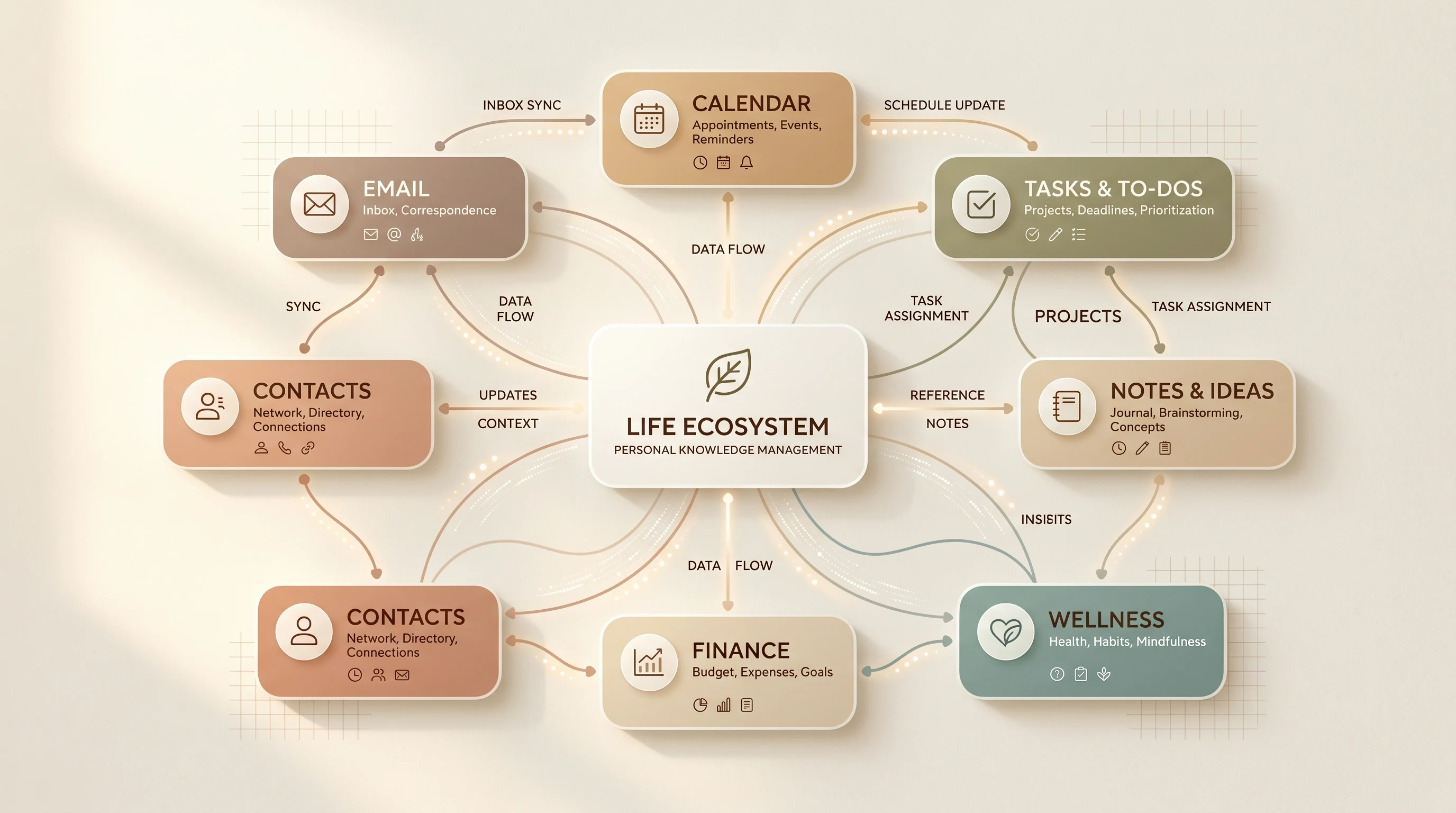 Visual diagram of contextual inbox architecture showing email integration with calendar tasks and life modules
Response Time Distribution Intelligence
An ai response time tracker does more than tell you how long you took to reply. It reveals patterns in who you respond to quickly and who you let wait — patterns that often contradict your stated priorities.
CORTEX tracks response time distributions across relationships and message types, then surfaces misalignments. You claim client communication is top priority, but your median response time to client emails is 18 hours while internal team emails get answered in 2 hours. You value mentorship, but the three junior colleagues who reached out this month are still waiting on replies while peer requests got handled same-day.
These patterns are invisible in the moment but visible in aggregate. The AI's role isn't to shame you — it's to create awareness loops that let you recalibrate behavior toward your actual values. When you see that you've been systematically slower with certain contacts, you can make conscious choices: Is this intentional prioritization, or am I avoiding something?
The most powerful implementation: CORTEX can preemptively surface emails where you're approaching your typical response threshold with a contact you've identified as high-priority. "You usually respond to [Name] within 6 hours. It's been 5. Would you like to respond now or schedule a reminder?"
How LIFE Implements This
The Email module in LIFE integrates directly with your existing inbox through secure IMAP/OAuth connections. You don't switch email clients — LIFE works as an intelligent layer above Gmail, Outlook, or whatever you already use.
When a new email arrives, CORTEX immediately processes it through the Contextual Inbox Architecture framework. It queries your Calendar module for scheduling conflicts, your Tasks module for related commitments, your Social module for relationship context, and your Progress module for relevant goals. This happens in milliseconds, before you ever see the message.
The interface surfaces emails in three dynamic queues: Critical (requires response today based on full context), Scheduled (batched by response type with suggested processing times), and Ambient (informational, no response needed, auto-archived after 48 hours unless you interact).
For each message in Critical or Scheduled, CORTEX provides:
- A one-line summary emphasizing decision points, not just content
- A priority score with transparent reasoning ("High: relates to 'Q2 Product Launch' task due Friday")
- Cross-module context cards showing relevant calendar events, tasks, notes, or relationship history
- Response templates matched to the situation, if applicable
- Suggested response timing based on your energy patterns and existing commitments
When you choose to respond, LIFE's smart email reply ai provides template starting points but never sends on your behalf without explicit confirmation. You maintain full control while offloading the cognitive overhead of starting from blank.
The Response Time Distribution dashboard appears in the Progress module, showing weekly patterns across key relationships and categories. You can set target response windows for specific contacts or types, and CORTEX will prioritize accordingly.
Integration with the ai task management system means emails that represent commitments automatically convert to tasks with context preserved. You don't copy-paste or mentally track what needs doing — the transition from inbox to task list is seamless.
Putting It Into Practice This Week
Even without LIFE, you can begin implementing Contextual Inbox Architecture with these steps:
Day 1: Audit your response time distribution. Use your email client's search to find the last 20 emails from your top-five priority contacts. Note the timestamp on their message and your response. Calculate the median. Now do the same for five random contacts. The gap reveals your actual prioritization versus your stated one.
Day 2: Create three saved searches or labels for your version of quick acknowledgments, deep responses, and conversation starters. Spend 15 minutes categorizing your current inbox into these buckets. Don't respond yet — just categorize.
Day 3: Process only quick acknowledgments during your first and last 30 minutes of the workday. Aim for sub-two-minute responses. Notice how much faster you move when you're not switching cognitive modes.
Day 4: Schedule a 90-minute focus block for deep responses. Before you start, gather any relevant context (documents, previous threads, calendar availability). Write responses with full attention. Notice the quality difference.
Day 5: Build your first response template library. Identify three questions you answer repeatedly (pricing, availability, introductions). Write your best version of each response and save them as drafts or in a note. Next time you encounter these, adapt rather than create from scratch.
Week 2: Set up a weekly review for conversation starters and networking emails. Batch-process these during a 30-minute block every Friday. Allow yourself to say no to most of them without guilt.
The goal isn't perfection — it's creating distinct processing modes that reduce cognitive switching costs and let you apply appropriate attention to each type of communication.
FAQ
What makes an AI email assistant different from regular email filters?
Traditional filters use static rules: if sender equals X or subject contains Y, then apply label Z. An ai email assistant uses dynamic context from your full life state. It evaluates each message against your current priorities, energy levels, schedule density, and relationship patterns. The same email might be high-priority Monday morning but low-priority Friday afternoon based on what else you're managing.
Can I use AI email features without giving up my current email provider?
Yes. LIFE's Email module connects to your existing inbox through secure protocols — you keep using Gmail, Outlook, or any IMAP-compatible provider. The AI layer operates above your email client, enriching and organizing messages without requiring you to switch platforms. You maintain full ownership of your email data and can disconnect at any time.
How does AI inbox triage handle sensitive or confidential emails?
CORTEX processes emails locally encrypted and never stores message content on external servers. Priority scoring and categorization happen using metadata and pattern matching, not by sending your email content to third-party APIs. Sensitive emails can be excluded from AI processing entirely through user-configurable rules. The system is designed for privacy-first operation.
Is an AI email summarizer accurate enough for important messages?
AI summarization works best as a preview layer, not a replacement for reading. CORTEX summarizes to help you decide what needs full attention now versus later. For messages tagged as high-priority or from key relationships, you should always read the full text before responding. The summarizer's role is reducing cognitive load during triage, not replacing judgment on important communications.
What's the learning curve for implementing this system?
Most users experience immediate value from basic prioritization and batching within their first week. The full Contextual Inbox Architecture takes 2–3 weeks to feel natural as you calibrate the AI to your priorities and communication style. The system learns faster if you provide explicit feedback (marking priority scores as accurate or incorrect), but it's designed to provide value even during the learning period.
How much time does the average person save with an AI email assistant?
Time savings vary by email volume and current workflow, but users processing 80+ emails daily typically report 45–60 minutes saved per day once the system is calibrated. The larger benefit often isn't time saved but decision quality improved — responding to the right people at the right time with appropriate thoughtfulness rather than reacting to whoever emailed most recently.
Can AI handle email on my behalf for routine responses?
LIFE's philosophy is AI-assisted rather than AI-automated. The system can draft responses and suggest when to send them, but it requires your confirmation before anything leaves your outbox. This maintains your authentic voice and prevents the trust erosion that comes from obviously automated responses. For true routine cases (out-of-office, basic acknowledgments), you can set up auto-responses with AI-refined templates.
How does this integrate with my existing productivity system?
The Email module is designed as part of LIFE's 13-module ecosystem, so integration with Tasks, Calendar, Notes, and other modules happens automatically. If you're using external tools, LIFE supports common integrations (Todoist, Google Calendar, Notion, etc.) through APIs. The goal is to meet you where you are while offering deeper integration if you adopt more of the LIFE system.
What happens if the AI misunderstands an email's priority?
Priority mismatches become learning opportunities. When you mark an email as more or less important than CORTEX suggested, the system updates its understanding of your preferences. Over time, calibration improves. The interface makes it easy to override AI suggestions with a single click, and frequent overrides in specific categories automatically trigger model adjustments.